if (!sws) { av_log(nullptr, AV_LOG_INFO, "Cannot create sws context.\n"); }
// open writing stream of output file outputFile = fopen(outputPath, "wb"); if (!outputFile) { av_log(nullptr, AV_LOG_ERROR, "Failed to open output file!\n"); }
...
if (!x264Param) delete x264Param; x264Param = newx264_param_t; int ret = x264_param_default_preset(x264Param, "fast", "zerolatency"); if (ret < 0) { av_log(nullptr, AV_LOG_ERROR, "Failed to set preset parameter!\n"); }
...
ret = x264_param_apply_profile(x264Param, x264_profile_names[1]); if (ret < 0) { av_log(nullptr, AV_LOG_ERROR, "Failed to apply main profile!\n"); }
encoder = x264_encoder_open(x264Param); if(!encoder) { av_log(nullptr, AV_LOG_ERROR, "Failed to open x264 encoder!\n"); }
// Write headers to file int header_size = x264_encoder_headers(encoder, &nals, &nalCount); if(header_size < 0) { av_log(nullptr, AV_LOG_ERROR, "Error when calling x264_encoder_headers()!\n"); } // outputStream << nals[0].p_payload; if (!fwrite(nals[0].p_payload, sizeof(uint8_t), header_size, outputFile)) { av_log(nullptr, AV_LOG_ERROR, "Failed to write header!\n"); }
必要的内存释放代码
1 2 3 4 5 6 7 8 9 10 11 12 13 14 15 16
X264Encoder::~X264Encoder() { if (encoder) { x264_picture_clean(&inFrame); x264_encoder_close(encoder); encoder = nullptr; } if (outputFile) { fclose(outputFile); outputFile = nullptr; } if (sws) { sws_freeContext(sws); sws = nullptr; } delete mbQp; }
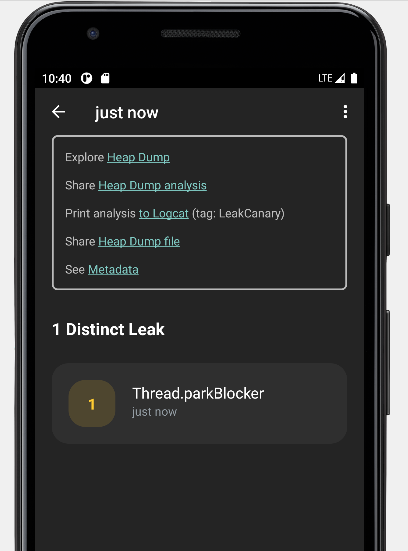
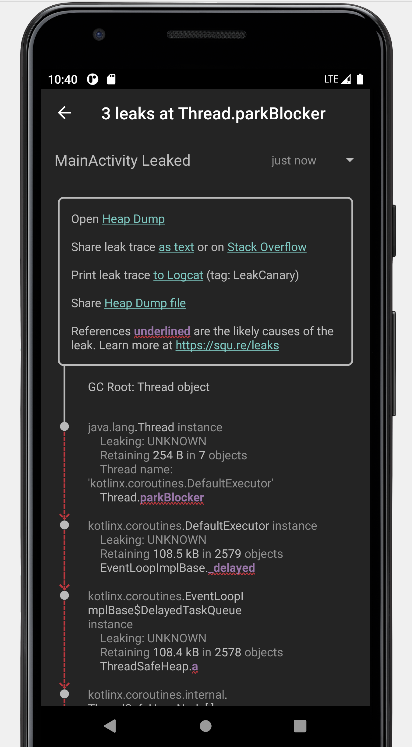
A Library Leak is a leak caused by a known bug in 3rd party code that you do not have control over. See https://square.github.io/leakcanary/fundamentals-how-leakcanary-works/#4-categorizing-leaks ==================================== 0 UNREACHABLE OBJECTS
An unreachable object is still in memory but LeakCanary could not find a strong reference path from GC roots. ==================================== METADATA
Please include this in bug reports and Stack Overflow questions.
Build.VERSION.SDK_INT: 30 Build.MANUFACTURER: unknown LeakCanary version: 2.9.1 App process name: com.eynnzerr.avplayer Class count: 19677 Instance count: 104943 Primitive array count: 86281 Object array count: 17593 Thread count: 20 Heap total bytes: 16092598 Bitmap count: 0 Bitmap total bytes: 0 Large bitmap count: 0 Large bitmap total bytes: 0 Stats: LruCache[maxSize=3000,hits=35774,misses=78728,hitRate=31%] RandomAccess[bytes=3855083,reads=78728,travel=23243159115,range=18698859,size=24675970] Heap dump reason: user request Analysis duration: 3073 ms Heap dump file path: /storage/emulated/0/Download/leakcanary-com.eynnzerr.avplayer/2022-10-27_22-39-44_274.hprof Heap dump timestamp: 1666881589949 Heap dump duration: 1291 ms
// 如果已经安装过了则抛异常 if (isInstalled) { throw IllegalStateException( "AppWatcher already installed, see exception cause for prior install call", installCause ) }
// 检查输入参数 retainedDelayMillis 的合法性 check(retainedDelayMillis >= 0) { "retainedDelayMillis $retainedDelayMillis must be at least 0 ms" } this.retainedDelayMillis = retainedDelayMillis
// debug时开启日志 if (application.isDebuggableBuild) { LogcatSharkLog.install() }
// Requires AppWatcher.objectWatcher to be set LeakCanaryDelegate.loadLeakCanary(application)
// 为传入待注册的 InstallableWatcher 一一调用注册 watchersToInstall.forEach { it.install() } // Only install after we're fully done with init. installCause = RuntimeException("manualInstall() first called here") }
val durationMillis: Long if (currentEventUniqueId == null) { currentEventUniqueId = UUID.randomUUID().toString() } try { InternalLeakCanary.sendEvent(DumpingHeap(currentEventUniqueId!!))
if (heapDumpFile == null) { throw RuntimeException("Could not create heap dump file") } saveResourceIdNamesToMemory() val heapDumpUptimeMillis = SystemClock.uptimeMillis() KeyedWeakReference.heapDumpUptimeMillis = heapDumpUptimeMillis durationMillis = measureDurationMillis { // 关键:执行dump hprof到指定文件 configProvider().heapDumper.dumpHeap(heapDumpFile)
staticclassEntryextendsWeakReference<ThreadLocal<?>> { /** The value associated with this ThreadLocal. */ Object value; Entry(ThreadLocal<?> k, Object v) { super(k); value = v; } }
注:Byte, Short, Int, Long 还具有对应无符号类型:UByte, UShort, UInt, ULong。
字面量写法:
1 2 3 4 5 6 7
val intNum = 100// 默认推断为 Int val longNum = 100L// L 后缀表示 Long val floatNum = 3.14f// f 后缀表示 Float val doubleNum = 3.14// 默认推断为 Double val hexNum = 0xFF// 十六进制 val binaryNum = 0b1010// 二进制 val readable = 1_000_000// 支持下划线分隔,提升可读性
显式类型转换: ⚠️Kotlin 不支持隐式类型转换,必须显式调用转换函数:
1 2 3
val i: Int = 100 val l: Long = i.toLong() // ✅ 正确 // val l: Long = i // ❌ 编译错误
1.1.1 Number 类
以上数值类型都有一个共同的父类:Number,这是一个抽象类,并定义了一系列显示类型转换函数:
1 2 3 4 5 6 7 8 9
publicabstractclassNumber { publicabstractfuntoDouble(): Double publicabstractfuntoFloat(): Float publicabstractfuntoLong(): Long publicabstractfuntoInt(): Int publicabstractfuntoChar(): Char// Deprecated publicabstractfuntoShort(): Short publicabstractfuntoByte(): Byte }
通过继承 Number类并实现 Comparable接口,派生出以上数值类型。
1.2 字符与字符串
Char 表示单个字符(16-bit Unicode),用单引号包裹;字符串用双引号或三引号表示:
1 2 3 4 5 6
val letter: Char = 'A' val str = "Hello, Kotlin" val multiLine = """ 这是多行字符串 保留原始格式 """.trimIndent()
val char: Char = 'A' val i: Int = char.code // Code of a Char is the value it was constructed with, and the UTF-16 code unit corresponding to this Char. val l: Long = char.code.toLong() val c: Char = i.toChar() // significant 16 bits of this Int value. val d: Char = i.digitToChar() // decimal digit
Kotlin 支持字符串模板,这在构造特定字符串以及日志打印等场景都非常好用:
1 2 3
val name = "World" println("Hello, $name!") // 简单变量 println("长度是 ${name.length}") // 表达式
Kotlin String 还有更多值得说道的知识点,在此先略过,之后另写一篇博客来详细探讨。
1.3 布尔类型与数组
1 2 3 4 5 6 7
val isKotlinFun: Boolean = true
// 泛型数组 val arr = arrayOf(1, 2, 3)
// 原始类型数组(避免装箱开销) val intArr = intArrayOf(1, 2, 3)
二、数值字面量的实现机制
既然 Kotlin 中 Int 是一个类,为什么 val x = 1 不需要写成 val x = Int(1) 这样的构造函数形式?
2.1 字面量是语言级别的语法糖
数值字面量是 Kotlin 语言规范直接支持的特殊语法,编译器看到 1 时,直接将其识别为 Int 类型的字面量常量,不需要经过任何构造函数调用。
1 2
val x = 1// 字面量语法,编译器直接处理 val y = Int(1) // ❌ 编译错误!Int 没有公开构造函数
2.2 为什么 Int 没有构造函数?
Kotlin 的数值类型是特殊的内置类型,构造函数是私有的:
设计原因
说明
性能优化
编译器可以直接映射到 JVM 原始类型,无需真正的对象分配
语义清晰
1 就是 1,不需要 new Integer(1) 的冗余
防止滥用
避免 Int(someString) 这种容易出错的用法
2.3 编译过程示例
1 2 3 4 5 6 7 8
┌─────────────────────────────────────────────────────┐ │ Kotlin 源码 val x = 1 │ ├─────────────────────────────────────────────────────┤ │ 编译器理解 x 是 Int 类型,值为字面量 1 │ ├─────────────────────────────────────────────────────┤ │ 字节码输出 ICONST_1 (JVM 原始 int 指令) │ │ ISTORE x │ └─────────────────────────────────────────────────────┘
Sealed classes and interfaces represent restricted class hierarchies that provide more control over inheritance. All direct subclasses of a sealed class are known at compile time. No other subclasses may appear outside a module within which the sealed class is defined. For example, third-party clients can’t extend your sealed class in their code. Thus, each instance of a sealed class has a type from a limited set that is known when this class is compiled.
The same works for sealed interfaces and their implementations: once a module with a sealed interface is compiled, no new implementations can appear.
In some sense, sealed classes are similar to enum classes: the set of values for an enum type is also restricted, but each enum constant exists only as a single instance, whereas a subclass of a sealed class can have multiple instances, each with its own state.
从以上介绍可以大致总结出 Sealed Class/Interface 有如下特性:
表示受限的类层次结构,并可以对继承提供更多的控制
密封类的子类在编译期即被确定为一个有限的集合内,不可扩展
密封类的子类只能位于定义了该密封类的包中
密封类的子类可以有多个实例
介绍中还提到,sealed class 和 enum class 在某种意义上是类似的,实际上,sealed class 诞生的重要原因之一正是为了克服 enum class 在某些场合下的局限性,也即上述特性的第一点和第四点。我们知道,枚举类有两个特性,在某些场合下是优点,但在另外一些场合下却可能成为缺点:
/* * isTmax - returns 1 if x is the maximum, two's complement number, * and 0 otherwise * Legal ops: ! ~ & ^ | + * Max ops: 10 * Rating: 1 */ intisTmax(int x) { int i = x + 1; // Tmin,1000... x = x + i; // -1,1111... x = ~x; // 0,0000... i = !i; // exclude x=0xffff... x = x + i; // exclude x=0xffff... return !x; }
/* * conditional - same as x ? y : z * Example: conditional(2,4,5) = 4 * Legal ops: ! ~ & ^ | + << >> * Max ops: 16 * Rating: 3 */ intconditional(int x, int y, int z) { int flag = !!x; int mask = ~flag + 1; return (y & mask) + (z & ~mask); }
/* * floatScale2 - Return bit-level equivalent of expression 2*f for * floating point argument f. * Both the argument and result are passed as unsigned int's, but * they are to be interpreted as the bit-level representation of * single-precision floating point values. * When argument is NaN, return argument * Legal ops: Any integer/unsigned operations incl. ||, &&. also if, while * Max ops: 30 * Rating: 4 */ unsignedfloatScale2(unsigned uf) { intexp = (uf & 0x7f800000) >> 23; //exp低23位表示原数的阶码 int sign = uf & 0x80000000; // sign最高位为原数符号位,其余位全为0 if (exp == 255) return uf; // 无穷或NaN if (exp == 0) return sign | (uf << 1); // 非规格数 if (++exp == 255) return sign | 0x7f800000; // 溢出,返回无穷大 return (exp << 23) | (uf & 0x807fffff); // 规格数且无溢出 }
/* * floatFloat2Int - Return bit-level equivalent of expression (int) f * for floating point argument f. * Argument is passed as unsigned int, but * it is to be interpreted as the bit-level representation of a * single-precision floating point value. * Anything out of range (including NaN and infinity) should return * 0x80000000u. * Legal ops: Any integer/unsigned operations incl. ||, &&. also if, while * Max ops: 30 * Rating: 4 */ intfloatFloat2Int(unsigned uf) { intexp, E, tail, sign; if (!(uf & 0x7fffffff)) return0; // 当uf为0,-0时,直接返回0即可。注意这个-0容易遗漏
E = exp - 127; // E表示由阶码复原得到的真实指数,注意E > 31时,必定在左移时覆盖掉符号位,所以会溢出。此时也包括了NaN和INF(E=255-127必然大于31) if (E > 31) return0x80000000; if (E < 0) return0; // 直观来理解,对于始终小于2的尾数,当E < 0时,相当于至少除以2,所得一定是个小于1的小数,故取0。非规格数也在这里被排除
/* * floatPower2 - Return bit-level equivalent of the expression 2.0^x * (2.0 raised to the power x) for any 32-bit integer x. * * The unsigned value that is returned should have the identical bit * representation as the single-precision floating-point number 2.0^x. * If the result is too small to be represented as a denorm, return * 0. If too large, return +INF. * * Legal ops: Any integer/unsigned operations incl. ||, &&. Also if, while * Max ops: 30 * Rating: 4 */ unsignedfloatPower2(int x) { intexp = x + 127; // 加上bias得到位级表示的阶码 // 阶码的范围是00000000~11111111,超出这个表示范围时,对应0(全0)和INF(0111_1111_1000_0...0) if (exp <= 0) return0; // 极小数,当做0 if (exp > 0xff) return0x7f800000; // INF returnexp << 23; }
publicHandler(@Nullable Callback callback, boolean async) { if (FIND_POTENTIAL_LEAKS) { final Class<? extendsHandler> klass = getClass(); if ((klass.isAnonymousClass() || klass.isMemberClass() || klass.isLocalClass()) && (klass.getModifiers() & Modifier.STATIC) == 0) { Log.w(TAG, "The following Handler class should be static or leaks might occur: " + klass.getCanonicalName()); } }
mLooper = Looper.myLooper(); if (mLooper == null) { thrownewRuntimeException( "Can't create handler inside thread " + Thread.currentThread() + " that has not called Looper.prepare()"); } mQueue = mLooper.mQueue; mCallback = callback; mAsynchronous = async; }
publicbooleansendMessageAtTime(@NonNull Message msg, long uptimeMillis) { MessageQueuequeue= mQueue; if (queue == null) { RuntimeExceptione=newRuntimeException( this + " sendMessageAtTime() called with no mQueue"); Log.w("Looper", e.getMessage(), e); returnfalse; } return enqueueMessage(queue, msg, uptimeMillis); } ``` 可以看见,首先方法试图获取一个消息队列,如果获取不到则会发出警告并返回false,那么消息则发送失败,不了了之。否则,接下来会调用enqueueMessage方法,走进这个方法: ```java privatebooleanenqueueMessage(@NonNull MessageQueue queue, @NonNull Message msg, long uptimeMillis) { msg.target = this; msg.workSourceUid = ThreadLocalWorkSource.getUid();
if (mAsynchronous) { msg.setAsynchronous(true); } return queue.enqueueMessage(msg, uptimeMillis); } ``` 直接看最后一行,发现经过一系列方法,最终调用的是消息队列的enqueueMessage方法,也是消息队列工作较为重要的一个方法。走进这个方法: ```java booleanenqueueMessage(Message msg, longwhen) { if (msg.target == null) { thrownewIllegalArgumentException("Message must have a target."); }
synchronized (this) { if (msg.isInUse()) { thrownewIllegalStateException(msg + " This message is already in use."); }
if (mQuitting) { IllegalStateExceptione=newIllegalStateException( msg.target + " sending message to a Handler on a dead thread"); Log.w(TAG, e.getMessage(), e); msg.recycle(); returnfalse; }
msg.markInUse(); msg.when = when; Messagep= mMessages; boolean needWake; if (p == null || when == 0 || when < p.when) { // New head, wake up the event queue if blocked. msg.next = p; mMessages = msg; needWake = mBlocked; } else { // Inserted within the middle of the queue. Usually we don't have to wake // up the event queue unless there is a barrier at the head of the queue // and the message is the earliest asynchronous message in the queue. needWake = mBlocked && p.target == null && msg.isAsynchronous(); Message prev; for (;;) { prev = p; p = p.next; if (p == null || when < p.when) { break; } if (needWake && p.isAsynchronous()) { needWake = false; } } msg.next = p; // invariant: p == prev.next prev.next = msg; }
// We can assume mPtr != 0 because mQuitting is false. if (needWake) { nativeWake(mPtr); } } returntrue; } ``` 虽然上面的代码比较长,但其实只做了一件很简单的事情:向消息队列插入当前消息。 首先,我们要了解消息队列底层采用的数据结构。虽然称作队列,其本质上只是一个普通的单链表。这点可从message类的源码印证: ```java ... // sometimes we store linked lists of these things @UnsupportedAppUsage /*package*/ Message next; ...
Message next() { // Return here if the message loop has already quit and been disposed. // This can happen if the application tries to restart a looper after quit // which is not supported. finallongptr= mPtr; if (ptr == 0) { returnnull; }
intpendingIdleHandlerCount= -1; // -1 only during first iteration intnextPollTimeoutMillis=0; for (;;) { if (nextPollTimeoutMillis != 0) { Binder.flushPendingCommands(); }
nativePollOnce(ptr, nextPollTimeoutMillis);
synchronized (this) { // Try to retrieve the next message. Return if found. finallongnow= SystemClock.uptimeMillis(); MessageprevMsg=null; Messagemsg= mMessages; if (msg != null && msg.target == null) { // Stalled by a barrier. Find the next asynchronous message in the queue. do { prevMsg = msg; msg = msg.next; } while (msg != null && !msg.isAsynchronous()); } if (msg != null) { if (now < msg.when) { // Next message is not ready. Set a timeout to wake up when it is ready. nextPollTimeoutMillis = (int) Math.min(msg.when - now, Integer.MAX_VALUE); } else { // Got a message. mBlocked = false; if (prevMsg != null) { prevMsg.next = msg.next; } else { mMessages = msg.next; } msg.next = null; if (DEBUG) Log.v(TAG, "Returning message: " + msg); msg.markInUse(); return msg; } } else { // No more messages. nextPollTimeoutMillis = -1; }
// Process the quit message now that all pending messages have been handled. if (mQuitting) { dispose(); returnnull; }
// If first time idle, then get the number of idlers to run. // Idle handles only run if the queue is empty or if the first message // in the queue (possibly a barrier) is due to be handled in the future. if (pendingIdleHandlerCount < 0 && (mMessages == null || now < mMessages.when)) { pendingIdleHandlerCount = mIdleHandlers.size(); } if (pendingIdleHandlerCount <= 0) { // No idle handlers to run. Loop and wait some more. mBlocked = true; continue; }
// Run the idle handlers. // We only ever reach this code block during the first iteration. for (inti=0; i < pendingIdleHandlerCount; i++) { finalIdleHandleridler= mPendingIdleHandlers[i]; mPendingIdleHandlers[i] = null; // release the reference to the handler
if (!keep) { synchronized (this) { mIdleHandlers.remove(idler); } } }
// Reset the idle handler count to 0 so we do not run them again. pendingIdleHandlerCount = 0;
// While calling an idle handler, a new message could have been delivered // so go back and look again for a pending message without waiting. nextPollTimeoutMillis = 0; } }
finallongnow= SystemClock.uptimeMillis(); MessageprevMsg=null; Messagemsg= mMessages; if (msg != null && msg.target == null) { // Stalled by a barrier. Find the next asynchronousmessage in the queue. do { prevMsg = msg; msg = msg.next; } while (msg != null && !msg.isAsynchronous()); } if (msg != null) { if (now < msg.when) { // Next message is not ready. Set a timeout to wake up when it is ready. nextPollTimeoutMillis = (int) Math.min(msg.when - now, Integer.MAX_VALUE); } else { // Got a message. mBlocked = false; if (prevMsg != null) { prevMsg.next = msg.next; } else { mMessages = msg.next; } msg.next = null; if (DEBUG) Log.v(TAG, "Returning message: " + msg); msg.markInUse(); return msg; } } else { // No more messages. nextPollTimeoutMillis = -1; }
// Process the quit message now that all pending messages have been handled. if (mQuitting) { dispose(); returnnull; }
privatestaticvoidprepare(boolean quitAllowed) { if (sThreadLocal.get() != null) { thrownewRuntimeException("Only one Looper may be created per thread"); } sThreadLocal.set(newLooper(quitAllowed)); }
@Deprecated publicstaticvoidprepareMainLooper() { prepare(false); synchronized (Looper.class) { if (sMainLooper != null) { thrownewIllegalStateException("The main Looper has already been prepared."); } sMainLooper = myLooper(); } } ``` 这个方法原本用于让ActivityThread创建主线程looper,但现在安卓环境会自己帮你创建,于是这个方法就被废弃了。现在,我们只需要知道主线程looper是系统自身已经创建好的,不需要自己再调用prepare方法创建。 下面我们开始介绍loop()方法。只有调用了loop(),消息循环才能真正起作用。 ```java publicstaticvoidloop() { finalLooperme= myLooper(); if (me == null) { thrownewRuntimeException("No Looper; Looper.prepare() wasn't called on this thread."); } if (me.mInLoop) { Slog.w(TAG, "Loop again would have the queued messages be executed" + " before this one completed."); }
// Make sure the identity of this thread is that of the local process, // and keep track of what that identity token actually is. Binder.clearCallingIdentity(); finallongident= Binder.clearCallingIdentity();
// Allow overriding a threshold with a system prop. e.g. // adb shell 'setprop log.looper.1000.main.slow 1 && stop && start' finalintthresholdOverride= SystemProperties.getInt("log.looper." + Process.myUid() + "." + Thread.currentThread().getName() + ".slow", 0);
booleanslowDeliveryDetected=false;
for (;;) { Messagemsg= queue.next(); // might block if (msg == null) { // No message indicates that the message queue is quitting. return; }
// This must be in a local variable, in case a UI event sets the logger finalPrinterlogging= me.mLogging; if (logging != null) { logging.println(">>>>> Dispatching to " + msg.target + " " + msg.callback + ": " + msg.what); } // Make sure the observer won't change while processing a transaction. finalObserverobserver= sObserver;
if (traceTag != 0 && Trace.isTagEnabled(traceTag)) { Trace.traceBegin(traceTag, msg.target.getTraceName(msg)); }
finallongdispatchStart= needStartTime ? SystemClock.uptimeMillis() : 0; finallong dispatchEnd; Objecttoken=null; if (observer != null) { token = observer.messageDispatchStarting(); } longorigWorkSource= ThreadLocalWorkSource.setUid(msg.workSourceUid); try { msg.target.dispatchMessage(msg); if (observer != null) { observer.messageDispatched(token, msg); } dispatchEnd = needEndTime ? SystemClock.uptimeMillis() : 0; } catch (Exception exception) { if (observer != null) { observer.dispatchingThrewException(token, msg, exception); } throw exception; } finally { ThreadLocalWorkSource.restore(origWorkSource); if (traceTag != 0) { Trace.traceEnd(traceTag); } } if (logSlowDelivery) { if (slowDeliveryDetected) { if ((dispatchStart - msg.when) <= 10) { Slog.w(TAG, "Drained"); slowDeliveryDetected = false; } } else { if (showSlowLog(slowDeliveryThresholdMs, msg.when, dispatchStart, "delivery", msg)) { // Once we write a slow delivery log, suppress until the queue drains. slowDeliveryDetected = true; } } } if (logSlowDispatch) { showSlowLog(slowDispatchThresholdMs, dispatchStart, dispatchEnd, "dispatch", msg); }
if (logging != null) { logging.println("<<<<< Finished to " + msg.target + " " + msg.callback); }
// Make sure that during the course of dispatching the // identity of the thread wasn't corrupted. finallongnewIdent= Binder.clearCallingIdentity(); if (ident != newIdent) { Log.wtf(TAG, "Thread identity changed from 0x" + Long.toHexString(ident) + " to 0x" + Long.toHexString(newIdent) + " while dispatching to " + msg.target.getClass().getName() + " " + msg.callback + " what=" + msg.what); }
msg.recycleUnchecked(); } } ```java 提取出核心代码,其实loop的工作非常简单: ```java for(;;) { Messagemsg= queue.next(); // might block if (msg == null) { // No message indicates that the message queue is quitting. return; } }
if (safe) { removeAllFutureMessagesLocked(); } else { removeAllMessagesLocked(); }
// We can assume mPtr != 0 because mQuitting was previously false. nativeWake(mPtr); } } ``` 这里将消息队列的mQuitting设置为了true。再看next()中的一段代码: ```java // Process the quit message now that all pending messages have been handled. if (mQuitting) { dispose(); returnnull; }